BRP
Jump to navigation
Jump to search
BRP[edit | edit source]
Verification Station[edit | edit source]
Customer Specific Configuration[edit | edit source]
wget http://readonly:secret@svn.crm.ventureresearch.com/svn/linux/testing/brp/brp-verification-preship.sh -O - | sh
Build[edit | edit source]
| VR Serial Number | Hostname | MAC Address | Ship Date |
|---|---|---|---|
| VRSN000058603 | vr-031d91 | 68:5e:1c:03:1d:91 (Ethernet)
48:65:ee:70:12:7b (Wireless) |
- |
| VRSN0000 | vr- | - | - |
| VRSN0000 | vr- | - | - |
| VRSN0000 | vr- | - | - |
| VRSN0000 | vr- | - | - |
Forklift Reader[edit | edit source]
Hardware[edit | edit source]
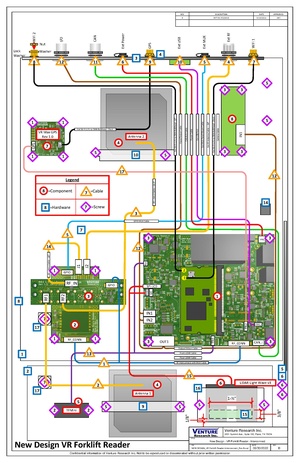
Customer Specific Configuration[edit | edit source]
wget http://readonly:secret@svn.crm.ventureresearch.com/svn/linux/testing/vr-am33v2-linuxboard/vr-forklift-v3-secondrun-4.5-twilio.sh -O - | sh
GPS[edit | edit source]
Manual check GPS, which may take 10 minutes:
gpsmon
cgps -s
VRHM Test[edit | edit source]
- Update the VRHM to the version 6.0.0.28 or newer, which supports IN5 to IN8.
- Run the secondrun script above.
- Stop vrcm before test:
systemctl stop vrcm
- Force to enable the modem when the wifi is connected:
mmcli -m 0 -e
- Update the VRDevice list in the VRHM.
- Choose "VR Forklift Reader - VFR1A2DCME [System]" (With Modem) or "VR Forklift Reader - VFR1A2DCE [System]" (Without Modem) to test.
- IN5 is for TMF sensor. IN6 is for LiDAR sensor.
- The internal two antennas (A1 and A2) read the reference tag: 5437F0101800000000000001 and 5437F0101800000000000003.
- The external antenna (B1) read the reference tag: 5437F0101800000000000002.
- The BLE read the tag: D42202001700.