VRCANReaderBoard
Jump to navigation
Jump to search
Bootloader Version History[edit | edit source]
All binary files are located under the SVN server: http://readonly:secret@svn.ventureresearch.com/svn/source/projects/STM32/STM32G474RE_Boot/Release.
- 1.03.03 (5/3/2024, latest version, switch bank when erase flash page)
- 1.03 (1/3/2024, update eeprom library)
- 1.02 (9/5/2023, rebuild for the RELEASE version)
wget http://readonly:secret@svn.ventureresearch.com/svn/source/projects/STM32/STM32G474RE_Boot/Release/1.03.03/0x0000/STM32G474RE_Boot.bin -O /tmp/STM32G474RE_Boot.bin
Application Version History[edit | edit source]
All binary files are located under the SVN server: http://readonly:secret@svn.ventureresearch.com/svn/source/projects/STM32/CAN_Reader_1.0/Release.
Board Rev 1.0[edit | edit source]
- 1.0.11 (11/29/2023, latest version, add multiple PASSTHRU commands)
wget http://readonly:secret@svn.ventureresearch.com/svn/source/projects/STM32/CAN_Reader_1.0/Release/1.0.11/0x10000/CAN_Reader_1.0.bin -O /tmp/CAN_Reader_1.0.bin
Board Rev 2.0[edit | edit source]
- 2.0.4 (6/13/2025, latest version, introduce SCANNERHEARTBEAT, HFREADERENABLED, etc.)
- 2.0.3 (5/3/2024, support the new bootloader - 1.03.03)
- 2.0.2 (4/12/2024, control barcode scanner)
- 2.0.1 (12/4/2023, new mercury api to support M7e)
wget http://readonly:secret@svn.ventureresearch.com/svn/source/projects/STM32/CAN_Reader_1.0/Release/2.0.4/0x10000/CAN_Reader_1.0.bin -O /tmp/CAN_Reader_1.0.bin
Programming VR CAN Reader Board v2.0[edit | edit source]
Preparation[edit | edit source]
- Required items: Linux Board with CAN bus connection, ST-LINK programmer
Bootloader Programming[edit | edit source]
Bin file location: C:\Users\mfc\svn\vr\source\projects\STM32\STM32G474RE_Boot\Release\1.03.03\0x0000\STM32G474RE_Boot.bin
- Open STM32CubeProgrammer program.
- Select 'Programming' section
 on the left menu.
 - Ensure settings are correct, and click the 'Start automatic mode' button.
- File Path for correct Boot Loader
- Start address 0x08000000
- Verify Programming checked
- Full Chip Erase checked
- Download File checked
- Option Bytes commands set to "-ob rdp=0xbb" for Code Readout Protection
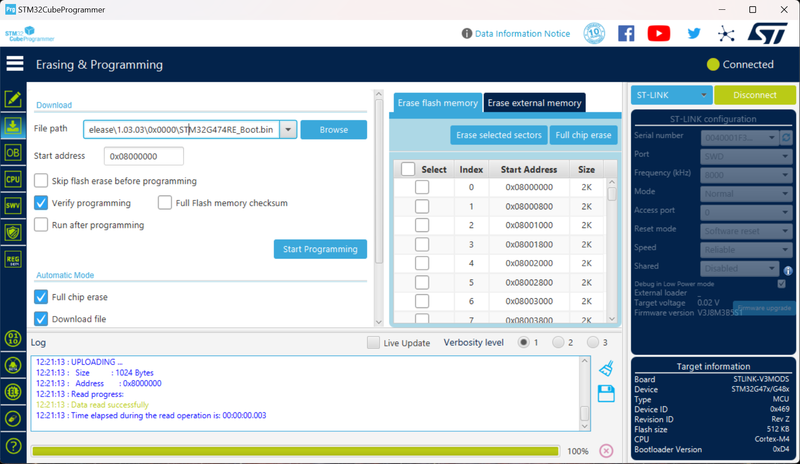
- Plug in the STM32 programming cable into the board.
- Power on the board.
- Watch the programming output to see if the board is programmed.


CAN Reader Board Firmware Programming[edit | edit source]
- Reset the board by unplugging and replugging in the Power / CAN cable.
- Watch the bootloader lights pattern to show fast blinking.
- Find the VRSerial of the CAN Reader Board you want to flash. If the board is brand-new, the default VRSerial is 00170.
- Execute the commands below to flash (the latest firmware version is 2.0.4):
cd /tmp
wget http://readonly:secret@svn.ventureresearch.com/svn/linux/testing/comtech/update-can-reader.sh -O update-can-reader.sh
bash update-can-reader.sh
Finally, verify the build version:
> get build
get build;ACK,
1:Jun 13 2025 13:09:44 r1955 BLv10303
> get version
get version;ACK,
1:2.0.4
VRSerial Setup[edit | edit source]
- If the board was flashed before, the VRSerial was already setup. Otherwise, setup a new VRSerial as the steps below:
- After programming, the board should reboot into the application. The application will connect over CAN and you should see it at address VRSN00000170.
- Set a VRSerial:
VRSN170 SET VRSERIAL 12345
- Set a ComponentID:
VRSN170 SET COMPONENTID 123
- Commit:
VRSN170 COMMIT
- Done! Apply a board serial number to the board.
Others[edit | edit source]
Flash in Production by STLink[edit | edit source]
Refer the steps
Flash in Production by SEGGER J-Link[edit | edit source]
See M:\$$-PRODUCTS\CAN Reader Board\Flash\Flash CAN Reader Board 20240417.pdf
Flash App Over CAN[edit | edit source]
Prerequisites:
- Install the flash tool on the VR Linux Board:
opkg update
opkg install vr-canboot
- Download the latest binary file you want to flash.
- Write down the VR Serial Number of the CAN Reader Board.
Start to flash by the command:
echo "CAN RESET" | nc localhost 2020 | grep "ACK"
sleep 1
vr-canboot -v -d -a <Serial Number> -f <Binary File> --start=0x10000